Error handling separates production-grade Node.js applications from hobby projects. These are the patterns we use to build systems that do not crash when things go wrong.
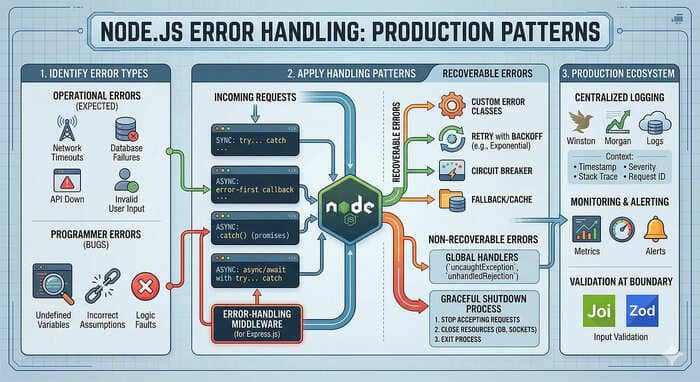
Node.js runs on an asynchronous, event-driven architecture. Error handling here works differently than in synchronous code. Getting it right prevents crashes, makes debugging easier, and keeps users happy even when things break.
Types of Errors in Node.js
Operational Errors
Expected errors you can handle:
- Connection failures
- File not found
- Invalid user input
- Timeouts
Programmer Errors
Bugs that should be fixed:
- Syntax errors
- Type errors
- Null pointer exceptions
- Memory leaks
Sync Error Handling
Try-Catch
// Synchronous code
try {
  const data = JSON.parse(userInput);
  console.log(data.name);
} catch (error) {
  console.error("Failed to parse:", error.message);
}
Error Types
try {
  // Some operation
} catch (error) {
  if (error instanceof TypeError) {
    // Handle type error
  } else if (error instanceof ReferenceError) {
    // Handle reference error
  } else {
    // Handle unknown error
  }
}
Async Error Handling
Callback Pattern
Error-first callbacks: first parameter is error:
fs.readFile("file.txt", (err, data) => {
  if (err) {
    console.error("Error reading file:", err);
    return;
  }
  console.log(data);
});
Promise .catch()
fetchUser(id)
  .then(user => {
    console.log(user.name);
  })
  .catch(error => {
    console.error("Failed to fetch user:", error);
  });
Async/Await with Try-Catch
async function getUser(id) {
  try {
    const user = await fetchUser(id);
    return user;
  } catch (error) {
    console.error("Error fetching user:", error);
    throw error;
  }
}
Also read in detail The Pitfalls of Using Async/Await Inside forEach() Loops
Global Unhandled Errors
Catch unhandled errors:
process.on("uncaughtException", (error) => {
  console.error("Uncaught Exception:", error);
  // Log to error tracking service
  // Gracefully shutdown
  process.exit(1);
});

process.on("unhandledRejection", (reason, promise) => {
  console.error("Unhandled Rejection at:", promise, "reason:", reason);
});
Custom Error Classes
Creating Custom Errors
class AppError extends Error {
  constructor(message, statusCode) {
    super(message);
    this.statusCode = statusCode;
    this.isOperational = true;
    Error.captureStackTrace(this, this.constructor);
  }
}

class NotFoundError extends AppError {
  constructor(resource) {
    super(`${resource} not found`, 404);
  }
}

class ValidationError extends AppError {
  constructor(message) {
    super(message, 400);
  }
}

class UnauthorizedError extends AppError {
  constructor(message = "Unauthorized") {
    super(message, 401);
  }
}
Using Custom Errors
function findUser(id) {
  const user = getUserFromDb(id);
  if (!user) {
    throw new NotFoundError("User");
  }
  return user;
}

async function handler(req, res) {
  try {
    const user = await findUser(req.params.id);
    res.json(user);
  } catch (error) {
    if (error instanceof NotFoundError) {
      return res.status(404).json({ error: error.message });
    }
    throw error;
  }
}
Express Error Handling
Sync Middleware Errors
// This catches sync errors
app.get("/users/:id", async (req, res, next) => {
  const user = await getUser(req.params.id);
  res.json(user);
});
Error Middleware
// Must have 4 parameters for Express to recognize as error handler
app.use((err, req, res, next) => {
  console.error("Error:", err);

  if (err.isOperational) {
    return res.status(err.statusCode).json({
      error: err.message
    });
  }

  // Unknown error - don't leak details
  return res.status(500).json({
    error: "Internal server error"
  });
});
Also read 7 Powerful Nodejs Middleware Patterns for Cleaner Expressjs Apps
Async Error Wrapper
const asyncHandler = (fn) => (req, res, next) => {
  Promise.resolve(fn(req, res, next)).catch(next);
};

// Usage
app.get("/users", asyncHandler(async (req, res) => {
  const users = await User.find();
  res.json(users);
}));
404 Handler
app.use((req, res) => {
  res.status(404).json({ error: "Not found" });
});
Logging Errors
Using Winston
import winston from "winston";

const logger = winston.createLogger({
  level: "error",
  format: winston.format.combine(
    winston.format.timestamp(),
    winston.format.json()
  ),
  transports: [
    new winston.transports.File({ filename: "error.log" }),
    new winston.transports.Console()
  ]
});

// Usage
try {
  await riskyOperation();
} catch (error) {
  logger.error("Operation failed", {
    error: error.message,
    stack: error.stack,
    userId: req.user?.id
  });
}
Pino (Faster Alternative)
import pino from "pino";

const logger = pino({
  level: "error",
  transport: {
    target: "pino/file",
    options: { destination: 1 }
  }
});
Error Correlation
Track errors across requests:
// Add request ID to all logs
app.use((req, res, next) => {
  req.id = req.headers["x-request-id"] || crypto.randomUUID();
  next();
});

app.use((err, req, res, next) => {
  logger.error({
    error: err.message,
    requestId: req.id,
    path: req.path,
    method: req.method
  });
  next();
});
Graceful Shutdown
Handle errors without crashing:
const server = app.listen(PORT, () => {
  console.log(`Server running on port ${PORT}`);
});

const shutdown = async (signal) => {
  console.log(`${signal} received, shutting down gracefully`);

  server.close(() => {
    console.log("HTTP server closed");
    mongoose.connection.close(false, () => {
      console.log("MongoDB connection closed");
      process.exit(0);
    });
  });

  // Force shutdown after 30 seconds
  setTimeout(() => {
    console.error("Forced shutdown after timeout");
    process.exit(1);
  }, 30000);
};

process.on("SIGTERM", () => shutdown("SIGTERM"));
process.on("SIGINT", () => shutdown("SIGINT"));
Testing Error Paths
Jest Example
describe("UserService", () => {
  it("should throw NotFoundError when user not found", async () => {
    const mockRepo = {
      findById: jest.fn().mockResolvedValue(null)
    };

    const service = new UserService(mockRepo);

    await expect(service.getUser("999")).rejects.toThrow(NotFoundError);
  });

  it("should return user when found", async () => {
    const mockUser = { id: "1", name: "John" };
    const mockRepo = {
      findById: jest.fn().mockResolvedValue(mockUser)
    };

    const service = new UserService(mockRepo);
    const result = await service.getUser("1");

    expect(result).toEqual(mockUser);
  });
});
Summary
- Distinguish error types - Operational vs programmer errors
- Use custom errors - Clear error types help debugging
- Handle async properly - Try-catch with async/await
- Centralize error handling - Express error middleware
- Log with context - Include request IDs, user IDs
- Handle uncaught errors - Process-level handlers
- Test error paths - Verify error handling works
- Graceful shutdown - Clean up on crashes
Proper error handling makes your application reliable and maintainable.
An ounce of prevention is worth a pound of cure - but when errors happen, handle them well.