Mongoose vs MongoDB Driver: When to Use What
Practical guide on choosing between Mongoose ODM and the native MongoDB driver for your Node.js applications.
On this page 10 sections
Should you reach for Mongoose or the native MongoDB driver? We have shipped both to production, and the honest answer is that neither one wins outright. The right pick depends on the request volume, how stable your data shape is, and how much your team values guardrails over raw speed.
Introduction
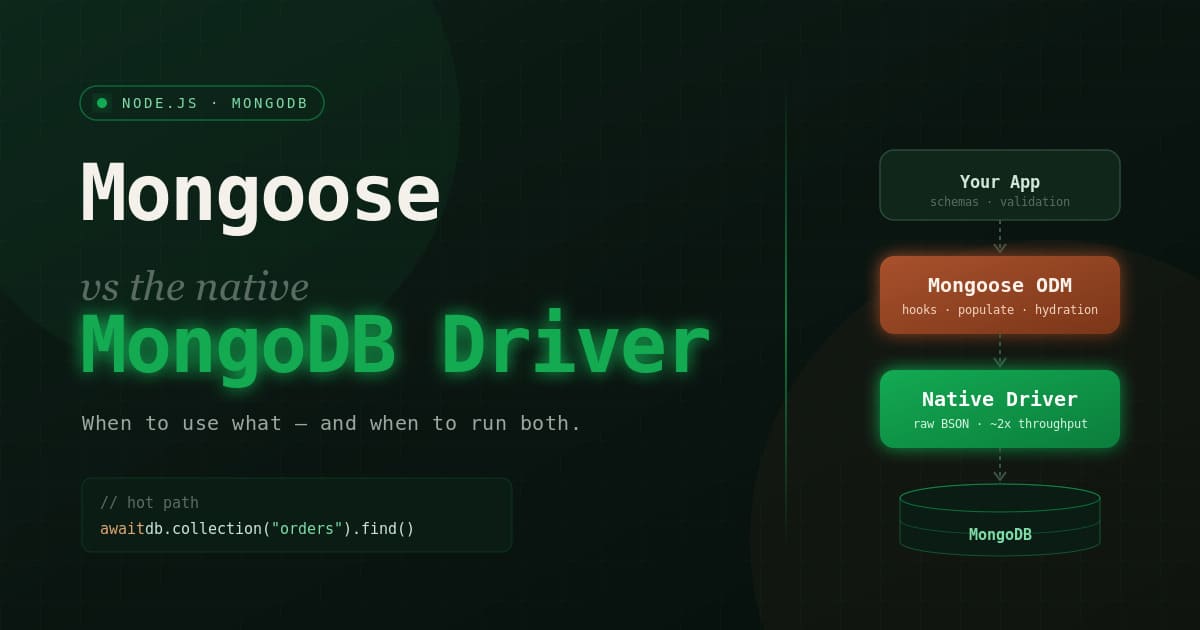
First, a quick clarification, because the names trip people up. MongoDB is the database. The native MongoDB driver is the official Node.js client that talks to it directly. Mongoose is an ODM (Object Data Modeling) library that sits on top of that same driver and adds schemas, validation, middleware, and population.
So Mongoose is not a competitor to the driver. It wraps it. Every Mongoose query eventually runs through the native driver underneath. The trade-off is the layer of features Mongoose adds, and the small performance cost that layer charges you.
Both are well maintained and both are fine choices. This guide walks through where each one earns its keep, what the performance gap actually looks like in numbers, and when it makes sense to run them side by side in the same app.
Quick Comparison
| Feature | MongoDB Driver | Mongoose |
|---|---|---|
| Schema | Flexible / dynamic | Enforced at the app layer |
| Learning curve | Lower | Higher |
| Performance | Faster | Slower, by a margin |
| Flexibility | Full access to MongoDB | Some abstraction in the way |
| Validation | You write it | Built in |
| TypeScript | Manual types | Inferred from schema |
| Features | Core MongoDB | Schemas, hooks, populate, plugins |
What the Performance Gap Actually Looks Like
“Faster” is vague, so here is a real measurement. A Jscrambler benchmark (December 2020, Express endpoints load-tested with Apache Bench) found the native driver around 2x faster than Mongoose.
The gap is not magic. Mongoose pays for three things the driver skips: schema validation on writes, middleware (pre/post hooks) execution, and document hydration, which is the cost of turning raw BSON into full Mongoose documents with getters, setters, and change tracking.
A rough rule of thumb (a heuristic, not a measured threshold): under about 50 requests per second with rich domain logic, the Mongoose overhead is invisible and the features pay for themselves. Above that, on hot paths and bulk jobs, the driver’s lower overhead starts to matter.
One caveat worth stating plainly. A lot of “Mongoose is slow” complaints disappear once you add .lean() to read-only queries. Lean skips hydration and returns plain JavaScript objects, which cuts CPU and memory on read-heavy paths. It will not erase the gap, though: the Mongoose read endpoint in the Jscrambler benchmark already used .lean(). Measure your own workload with lean turned on before deciding.
MongoDB Driver Deep Dive
When to Use the Driver
The native driver is ideal when:
- You need maximum performance
- Your schema is highly variable
- You’re building microservices
- You prefer to work with MongoDB directly
Basic Usage
import { MongoClient } from "mongodb";

const client = new MongoClient("mongodb://localhost:27017");
await client.connect();
const db = client.db("myapp");

// Insert document
await db.collection("users").insertOne({
  name: "John",
  email: "[email protected]",
  age: 30
});

// Find documents
const users = await db.collection("users")
  .find({ age: { $gte: 18 } })
  .toArray();

// Update document
await db.collection("users").updateOne(
  { _id: userId },
  { $set: { name: "Jane" } }
);

// Delete document
await db.collection("users").deleteOne({ _id: userId });
Advanced Features
The driver gives you direct, unwrapped access to aggregation, transactions, and change streams. If you live in complex pipelines, this is where the native API shines. For tuning those pipelines once they grow, see MongoDB aggregation pipeline performance tuning. Transactions work the same way through Mongoose sessions, covered in mastering Mongoose transactions.
// Aggregation
const result = await db.collection("orders").aggregate([
  { $match: { status: "completed" } },
  { $group: { _id: "$customerId", total: { $sum: "$amount" } } },
  { $sort: { total: -1 } }
]).toArray();

// Transactions (requires replica set)
const session = client.startSession();
try {
  await session.withTransaction(async () => {
    await db.collection("accounts").updateOne(
      { _id: fromAccount },
      { $inc: { balance: -100 } },
      { session }
    );
    await db.collection("accounts").updateOne(
      { _id: toAccount },
      { $inc: { balance: 100 } },
      { session }
    );
  });
} finally {
  await session.endSession();
}

// Change Streams (realtime updates)
const changeStream = db.collection("orders").watch();
changeStream.on("change", (change) => {
  console.log("Order changed:", change);
});
Performance Benefits
// Use projection to limit fields over the wire
const users = await db.collection("users")
  .find({})
  .project({ name: 1, email: 1 })  // Only these fields
  .toArray();

// The driver already returns plain JS objects.
// There is no .lean() here, and you do not need one.
// (lean() is a Mongoose method that skips document hydration.)
const active = await db.collection("users")
  .find({ status: "active" })
  .toArray();

// Use bulkWrite for batched operations in one round trip
await db.collection("users").bulkWrite([
  { insertOne: { document: { name: "User1" } } },
  { insertOne: { document: { name: "User2" } } },
  { deleteMany: { filter: { status: "old" } } }
]);
Mongoose Benefits
When to Use Mongoose
Mongoose is the better fit when:
- You want schema validation enforced before data hits the database
- You rely on built-in middleware and hooks for cross-cutting logic
- You join documents across collections with populate
- You’re building standard CRUD apps with clear, stable models
- Your team prefers an ORM-style API and TypeScript types inferred from the schema
A quick note on TypeScript, since it comes up a lot. Mongoose generates document types from your schema definition, so you get autocomplete and compile-time checks for free. With the native driver you supply the types yourself, usually through a generic on the collection, which is more work but also more explicit.
Basic Usage
import mongoose from "mongoose";

const userSchema = new mongoose.Schema({
  name: { type: String, required: true },
  email: { type: String, required: true, unique: true },
  age: { type: Number, min: 0 },
  status: { type: String, enum: ["active", "inactive"], default: "active" },
  createdAt: { type: Date, default: Date.now }
});

// Virtual property
userSchema.virtual("fullName").get(function() {
  return `${this.name}`;
});

// Pre-save middleware
userSchema.pre("save", function(next) {
  this.updatedAt = new Date();
  next();
});

// Method
userSchema.methods.getInfo = function() {
  return `${this.name} (${this.email})`;
};

// Static
userSchema.statics.findActive = function() {
  return this.find({ status: "active" });
};

const User = mongoose.model("User", userSchema);

// Create
const user = await User.create({
  name: "John",
  email: "[email protected]",
  age: 30
});

// Find
const users = await User.find({ age: { $gte: 18 } });

// Update
await user.set({ name: "Jane" });
await user.save();

// Delete
await user.deleteOne();
Schema Validation
Validation is the headline reason teams reach for Mongoose. You declare rules once on the schema, and Mongoose enforces them on every write. For a deeper treatment, including custom validators and the patterns to avoid, see Mongoose schema validation best practices.
const userSchema = new mongoose.Schema({
  // String validations
  email: {
    type: String,
    required: true,
    unique: true,
    lowercase: true,
    trim: true,
    match: [/^\S+@\S+\.\S+$/, "Invalid email"]
  },

  // Number validations
  age: {
    type: Number,
    min: [0, "Age cannot be negative"],
    max: [120, "Age seems invalid"]
  },

  // Array validation
  tags: {
    type: [String],
    validate: {
      validator: function(v) {
        return v.length <= 10;
      },
      message: "Too many tags"
    }
  },

  // Custom validation
  password: {
    type: String,
    required: true,
    validate: {
      validator: function(v) {
        return v.length >= 8 && /\d/.test(v);
      },
      message: "Password must be 8+ chars with a number"
    }
  }
});
Middleware and Hooks
Hooks let you run logic before or after an operation without scattering it across your controllers. Hashing a password before save, writing an audit log after delete, that kind of thing. The pre and post hooks guide covers the gotchas around this binding and document versus query middleware.
// Pre middleware
userSchema.pre("save", function(next) {
  console.log("About to save:", this.name);
  next();
});

// Post middleware
userSchema.post("save", function(doc) {
  console.log("Saved:", doc._id);
});

// Pre validation
userSchema.pre("validate", function(next) {
  if (this.isNew && !this.password) {
    this.password = generateRandomPassword();
  }
  next();
});

// Pre remove
userSchema.pre("deleteOne", { document: true, query: false }, async function() {
  await Log.create({ action: "user_deleted", userId: this._id });
});
Population (Joins)
Populate is Mongoose’s answer to joins. You store references by ObjectId and Mongoose fetches the related documents for you, behind the scenes, in a separate query. It is convenient, but it is not free at scale. The Mongoose population deep dive explains how it works under the hood and when an aggregation $lookup is the better call.
const orderSchema = new mongoose.Schema({
  user: { type: mongoose.Schema.Types.ObjectId, ref: "User" },
  items: [{
    product: { type: mongoose.Schema.Types.ObjectId, ref: "Product" },
    quantity: Number
  }]
});

const Order = mongoose.model("Order", orderSchema);

// Simple population
const orders = await Order.find().populate("user");

// Selective population
await Order.find().populate({
  path: "user",
  select: "name email"
});

// Deep population
await Order.find().populate({
  path: "items.product",
  select: "name price"
});
Decision Framework
Use MongoDB Driver When:
✓ Performance is critical
✓ Schema is highly dynamic
✓ Building microservices
✓ Working with large datasets
✓ Need fine-grained control
✓ Building a library and don't want to impose an ODM
Use Mongoose When:
✓ Need schema validation
✓ Want built-in hooks/middleware
✓ Need population features
✓ Building standard CRUD apps
✓ Team prefers ORM patterns
✓ Prototyping quickly
Hybrid Approach: Use Both
This is what most mature codebases actually do, and it is the answer the “which one” question usually resolves to. Start with Mongoose for the bulk of your app, where validation and clear models save time. Then drop down to the native driver on the handful of routes where throughput matters: analytics rollups, bulk imports, high-frequency writes.
You do not even need a second connection. Mongoose exposes the underlying driver through mongoose.connection.db, so the hot paths can bypass hydration while the rest of the app keeps its guardrails.
import mongoose from "mongoose";

await mongoose.connect("mongodb://localhost:27017/myapp");

// Reuse Mongoose's underlying driver connection; no second client needed
const db = mongoose.connection.db;

// Use Mongoose for user management
const User = mongoose.model("User", userSchema);

// Use driver for performance-critical operations
const orders = await db.collection("orders")
  .find({ status: "pending" })
  .limit(1000)
  .toArray();

// Mix in same project
app.get("/users", async (req, res) => {
  const users = await User.find();  // Mongoose
  res.json(users);
});

app.get("/analytics", async (req, res) => {
  const result = await db.collection("events").aggregate([  // Driver
    { $group: { _id: "$type", count: { $sum: 1 } } }
  ]).toArray();
  res.json(result);
});
Using Raw Queries in Mongoose
// Run raw MongoDB query in Mongoose
const result = await User.aggregate([
  { $match: { status: "active" } },
  { $group: { _id: "$age", count: { $sum: 1 } } }
]);

// Execute raw command
await mongoose.connection.db.command({ ping: 1 });
Migration Guide
Converting from Mongoose to Driver
// Mongoose
const User = mongoose.model("User", userSchema);
const users = await User.find({ status: "active" }).lean();

// Driver equivalent
const db = mongoose.connection.db;
const users = await db.collection("users")
  .find({ status: "active" })
  .toArray();
Converting from Driver to Mongoose
// Driver
const user = await db.collection("users").findOne({ _id });

// Mongoose
const User = mongoose.model("User");
const user = await User.findById(id);
Frequently Asked Questions
Is Mongoose still worth using in 2026? Yes, for most web application backends. It is actively maintained and the productivity it buys, through validation, hooks, and typed models, outweighs the overhead for the majority of CRUD-heavy apps. The case for skipping it is narrow: very high throughput, heavily dynamic schemas, or libraries where you do not want to impose an ODM on your users.
Is Mongoose slower than the native driver?
On paper, roughly 2x slower for equivalent operations, because of validation, middleware, and document hydration. In practice the gap shrinks a lot for reads once you use .lean(), and for most apps under moderate load it is not the bottleneck. Measure before you optimize.
Can I use Mongoose and the native driver in the same project?
Yes, and it is a common pattern. Reach the driver through mongoose.connection.db for performance-critical paths and keep Mongoose everywhere else. No second connection required.
Does Mongoose replace MongoDB? No. MongoDB is the database. Mongoose is a library that talks to MongoDB through the native driver. You always need MongoDB running underneath, whichever client you choose.
Summary
- MongoDB Driver is the lean choice: maximum performance, full access to MongoDB features, dynamic schemas, and microservices.
- Mongoose is the productive choice: schema validation, middleware, populate, and TypeScript types for standard CRUD apps.
- Both together is what most production systems land on, Mongoose by default with the driver on the hot paths.
Pick by request volume and how stable your data shape is. If you are building a typical backend, start with Mongoose, lean your read queries, and drop to the driver only where the numbers tell you to. To keep Mongoose fast as you grow, read up on schema anti-patterns to avoid and MongoDB index optimization.
Official docs: MongoDB Node.js Driver | Mongoose